Sat Nav on Your Driving Test: What Happens If You Go the Wrong Way?
Taking a wrong turn during your driving test does not automatically mean you’ve failed. Discover what examiners assess, how to follow sat nav directions safely and why your driving decisions matter more than perfect navigation.
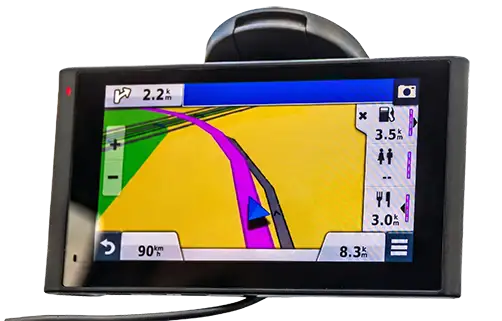
Following a sat nav shouldn’t be something to worry about
Imagine approaching a roundabout during your driving test. The sat nav tells you to turn right, but you’ve already positioned yourself in the left-hand lane.
Do you try to change lanes at the last second, panic because you’re about to go the wrong way, or simply continue safely?
The safest decision is to follow your lane and allow the examiner to help you return to the route.
At Andrew’s Driving School, we help learners prepare for independent driving by developing their observation, planning and decision-making skills.
One of the most important lessons is that following directions correctly must never take priority over driving safely.
How does independent driving work?
During your practical driving test, you’ll be asked to drive independently while following directions from a sat nav, road signs or a combination of both.
20 to 35 minutes
Independent driving usually lasts between 20 and 35 minutes on a standard car driving test. Under current DVSA rules, it may continue for the entire test.
Following directions
You may follow a sat nav, traffic signs or both. The examiner will explain which method you need to use.
Safe driving
You’re assessed on your driving skills, including observations, positioning, planning and responding safely to other road users.
Not a navigation test
You don’t need to know the local roads or memorise the route. Taking a wrong turning isn’t automatically recorded as a driving fault.
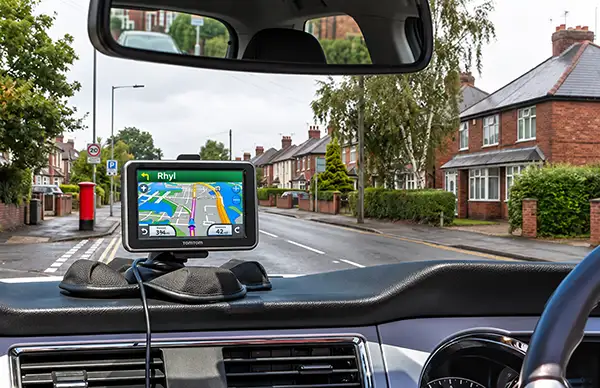
Who provides the sat nav on your driving test?
One of the questions we’re frequently asked at Andrew’s Driving School is whether learners need to bring their own sat nav to the practical driving test.
The answer is no. The driving examiner provides the sat nav and sets everything up for you.
The DVSA uses the TomTom Start 52, with the driving test routes already programmed into the device.
Before you begin following the sat nav directions, the examiner positions the device on the dashboard. It is normally secured using a weighted, beanbag-style dashboard mount.
This allows the screen to remain visible without needing to attach the sat nav directly to the windscreen.
- The examiner brings the sat nav to your test.
- The test route is already programmed into it.
- The examiner positions the device on the dashboard.
- You don’t need to enter a destination.
- You won’t need to touch or operate the device.
- You cannot use your own sat nav instead.
Your only responsibility is to follow the directions as safely as possible while concentrating on the road ahead.
Buy a TomTom Sat NavWant to practise with a TomTom sat nav?
The TomTom Start 52 was the original sat nav introduced by the DVSA for practical driving tests.
If you’d like to become more familiar with TomTom navigation before your test, the newer TomTom GO Classic Lite 6-inch is an option worth considering.
It offers spoken directions, a clear map display and turn-by-turn navigation, allowing you to practise following directions on unfamiliar roads.
Remember, you don’t need to purchase a sat nav specifically for your driving test. You can develop the same important skills using other navigation devices during your lessons.
The aim is to practise safe, independent driving, not to memorise a particular device.
Ad – Amazon affiliate link
View TomTom GO Classic Lite on Amazon
As an Amazon Associate I earn from qualifying purchases. If you purchase through this link, Andrew’s Driving School may receive a small commission at no additional cost to you.
Will I fail my driving test for taking a wrong turn?
No. Taking a wrong turn does not automatically cause you to fail your driving test.
The DVSA confirms that examiners do not record a fault simply because a candidate takes the wrong turning. What matters is how safely you deal with the situation.
Missing a turning
The sat nav tells you to turn left, but you’ve already passed the junction. You continue safely along the road.
No fault simply for missing the turn. The examiner will help you return to the route.
Taking the wrong roundabout exit
You’re supposed to take the second exit but accidentally take the third. You maintain safe observations, positioning and control.
Not automatically a fault. Your driving decisions are what matter.
Changing lanes suddenly
You realise you’re in the wrong lane and steer across without checking whether it’s safe, causing another driver to brake sharply.
This could result in a serious or dangerous fault because of the unsafe manoeuvre.
Braking sharply to make a turn
You notice a turning too late and brake unnecessarily or make an unpredictable manoeuvre to avoid missing it.
You could receive a fault depending on how your actions affect safety and other road users.
It’s better to go the wrong way safely than the right way dangerously
If you’re already committed to a lane and cannot safely follow the sat nav’s instruction, continue in the direction permitted by that lane.
Never swerve, make a sudden lane change or brake sharply just to stay on the planned route.
The examiner would rather see a safe, sensible decision than a dangerous attempt to follow the directions perfectly.
What should you do if you’re in the wrong lane?
Imagine approaching a roundabout in the left-hand lane, which is marked for going straight ahead. The sat nav tells you to turn right.
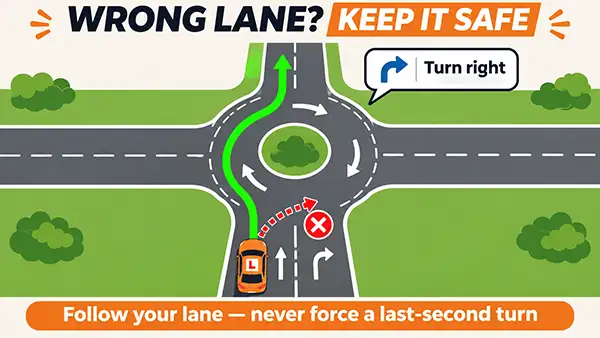
- Check the road signs and lane markings.
- Recognise where your current lane allows you to go.
- Only change lanes if it is safe and legal to do so.
- Never force a last-second manoeuvre.
- Continue safely if you cannot follow the planned route.
- Allow the examiner to help you return to the route.
Good independent driving isn’t about getting every turning right. It’s about recognising situations and making appropriate decisions.
Need more help with roundabout lanes?
Our detailed roundabout lane guide explains how to choose the correct lane, understand road markings and position safely when approaching and leaving roundabouts.
Read Our Roundabout Lane GuideDon’t rely on the sat nav for your speed limit
The speed limit displayed on a sat nav may be incorrect or out of date. This is particularly important when taking a driving test in Wales.
Wales and the 20mph limit
Since September 2023, the default speed limit on most restricted roads in Wales has been 20mph.
Some sat navs may still display 30mph on roads where the legal limit is now 20mph.
Use your car’s speedometer
Always use the speedometer fitted to your vehicle to monitor your actual driving speed.
The speed shown on the sat nav may differ from your car’s speedometer. Driving examiners assess speed using the vehicle’s speedometer.
Recognise the legal limit
Pay attention to speed limit signs and understand how the default limits apply to different roads.
In Wales, a road with street lighting will often have a 20mph limit unless signs indicate otherwise.
Technology can be wrong
Sat nav mapping information may not reflect recent changes to speed limits or road layouts.
Following an incorrect speed limit displayed on the sat nav could lead to a speeding fault during your driving test.
When the sat nav said 30mph but the limit was 20mph
I remember sitting in the back of the car during one of our pupils’ driving tests in Wales.
We were travelling along a road with a 20mph speed limit, but the sat nav was still displaying 30mph.
The pupil was following the speed shown on the sat nav rather than recognising the actual speed limit.
Sitting in the back, knowing what was happening but unable to say anything, I was practically willing the pupil to slow down!
It’s one of those moments that really brings home why we emphasise this during lessons.
The sat nav can be wrong. The responsibility for recognising the correct speed limit always rests with the driver.
— Andrew, Andrew’s Driving School
Remember these three things
The sat nav tells you where to go.
The road signs and applicable road rules tell you the speed limit.
Your speedometer tells you how fast you’re travelling.
At Andrew’s Driving School, we encourage learners to recognise speed limits independently rather than relying on technology.
Six tips for following a sat nav safely
These simple habits will help you manage directions while keeping your attention on the road.
1. Glance, don’t stare
Take brief glances at the sat nav when safe. Keep most of your attention on the road, traffic and developing hazards.
2. Listen to the directions
Use the spoken instructions and let the screen support your understanding. You don’t need to watch the display continuously.
3. Plan your position early
Look for road signs and lane markings well before a junction. Consider your lane choice and whether it’s safe to change position.
4. Road signs take priority
Follow legal signs, signals and road markings. Never obey a sat nav instruction that would require you to break the rules of the road.
5. Check your speedometer
Don’t rely on the sat nav’s speed reading or displayed speed limit. Use your vehicle’s speedometer and recognise the correct limit.
6. Let mistakes go
If you miss a turning, continue safely. Don’t allow one navigation mistake to distract you from the rest of your test.
Can you ask the examiner for help?
Yes. If you haven’t heard an instruction properly or you’re unsure which turning to take, you can ask the examiner to clarify.
For example, you might ask:
- “Sorry, was that the next left?”
- “Can you confirm which exit I need?”
- “I didn’t quite catch that instruction.”
Asking for clarification isn’t automatically a driving fault.
Can the examiner override the sat nav?
Yes. The driving examiner can override the sat nav and give you verbal directions during your driving test.
This might happen if you’ve taken a wrong turning, the planned route needs to change, or the examiner needs to direct you somewhere different from the route shown on the screen.
If the examiner gives you a verbal direction, follow the examiner’s instruction rather than the sat nav, as long as it is safe and legal to do so.
For example, the sat nav might tell you to turn right, but the examiner may say:
“At the next junction, I’d like you to turn left, please.”
In that situation, you should follow the examiner’s direction and turn left safely.
Once you’re back on the programmed route, the examiner will normally let you know that you should resume following the sat nav. They might say something like:
“OK, you’re back on the route now. Please continue following the sat nav.”
Until the examiner tells you to resume following the sat nav, continue following their verbal directions.
What if the sat nav stops working?
If the sat nav freezes, loses its signal or develops a technical problem, the examiner can take over and provide verbal directions.
You won’t be expected to fix the device or operate it while driving.
Remember: whether directions come from the sat nav or the examiner, your responsibility remains the same — drive safely, obey road signs and make sensible decisions.
How can you practise sat nav driving?
Following directions should become a familiar part of your driving lessons before you take your test.
Ask your instructor to include exercises such as:
- Following directions around unfamiliar roads.
- Planning lane choices at roundabouts.
- Recognising when a turning has been missed.
- Continuing safely when you’re in the wrong lane.
- Identifying road signs that override sat nav directions.
- Recognising speed limits without relying on the device.
- Using sat nav directions during a mock driving test.
These exercises help develop the awareness, judgement and independence you’ll need when driving alone after passing your test.
Try this sat nav exercise with your instructor
One of the best ways to prepare for independent driving is to practise following directions somewhere you don’t know particularly well.
Ask your instructor to plan a route that includes different types of junctions, roundabouts and changes in road speed limits.
Follow an unfamiliar route
Follow the sat nav directions while continuing to make your own decisions about speed, positioning, observations and road signs.
Try not to rely on your instructor to tell you what to do at every junction.
Practise missing a turning
Your instructor can deliberately ask you to continue past a turning shown on the sat nav.
Practise remaining calm, continuing safely and allowing the route to be recalculated.
Recognise speed limits
Identify the correct speed limit using road signs and your knowledge of the applicable limits.
In Wales, pay particular attention to roads with a default 20mph limit. Don’t rely on the sat nav’s display.
Review your decisions
At the end of the drive, discuss with your instructor how well you anticipated junctions, selected lanes and managed any unexpected situations.
Identify one or two things you could improve during your next lesson.
A useful challenge
Ask your instructor to give you fewer directions as your confidence develops.
The aim is to reach a point where you can follow an unfamiliar route while independently managing the safety of your driving.
Remember: the sat nav provides directions, but you’re responsible for driving the car.
Wrong turns vs driving faults: What’s the difference?
Not every mistake during independent driving results in a driving fault.
The important distinction is between making a navigation mistake and making an unsafe driving decision.
| Situation | Driving test outcome |
|---|---|
| Missing a turning but continuing safely | ✓ No fault |
| Taking the wrong roundabout exit safely | ✓ No fault |
| Following the examiner’s revised directions safely | ✓ No fault |
| Asking the examiner to clarify a direction | ✓ No fault |
| Changing lanes dangerously to make a turning | ✕ Potentially serious or dangerous |
| Failing to give way because you’re distracted by the sat nav | ✕ Potentially serious or dangerous |
| Exceeding the speed limit because the sat nav shows an incorrect limit | ! Fault severity depends on circumstances |
The important thing to remember
Going the wrong way isn’t the problem. Driving unsafely while doing so is.
The examiner assesses the safety of your driving decisions, not your ability to navigate perfectly.
What happens if the sat nav recalculates your route?
If you miss a turning during your driving test, the sat nav may automatically calculate a different route to get you back on track.
Don’t panic or try to find your own way back to the original route.
Simply continue driving safely and concentrate on the road ahead.
The examiner may give you directions
If you go off the planned route, the examiner may decide to give you verbal directions rather than letting you follow the new route calculated by the sat nav.
For example, the examiner might say:
“At the next roundabout, take the second exit, please.”
If the examiner gives you a direction, follow their instruction rather than the sat nav, provided it is safe and legal to do so.
Once you’re back on the intended route, the examiner will normally let you know that you should resume following the sat nav.
They might say:
“OK, you’re back on the route now. Please continue following the sat nav.”
Does the examiner giving directions mean you’ve made a fault?
No. Not necessarily.
Some learners become worried when the examiner starts giving verbal directions during independent driving.
However, this is a normal part of the test and doesn’t automatically mean you’ve done anything wrong.
The examiner might intervene with directions because:
- You’ve missed a turning but continued safely.
- The sat nav has recalculated a different route.
- Roadworks or a road closure require a change of route.
- The examiner needs to guide you back onto the planned route.
- The sat nav has developed a technical problem.
None of these situations automatically means you’ve received a driving fault.
What matters is whether you’ve maintained safe observations, positioning, control and awareness of other road users.
Remember: an examiner giving directions is not the same as an examiner recording a driving fault.
Explore More Driving Guides
Looking for more driving advice? Explore our collection of practical guides covering driving lessons, road safety, manoeuvres, driving tests and helpful tips for learner and newly qualified drivers.